Storyboard
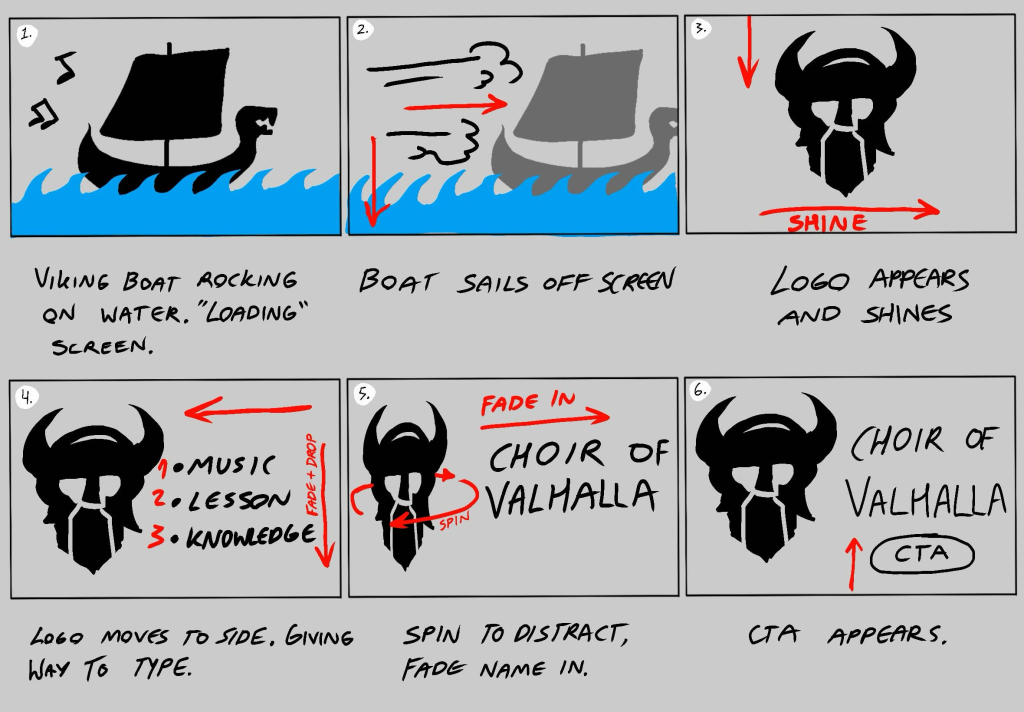
Planning out the animation has been very beneficial, since it means I could put 100% of my concentration into improving each stage without forgetting my intentions for the rest of the animation. It has also helped me add and rule out some decisions before I spent too much time and effort into incorporating them. It also allowed me to proof check if every animation and asset fits with the brand personality and identity.
Fullscreen animation
This was the biggest After effects project I have done so far, with unique 9 moving elements. I purposely made the visuals unrelated to the logo use unique colours not used anywhere else in my brand, this was done to separate the fun visuals from the brand so that the user can see where the captivating point ends and where the real advertisement begins.
Overall it captures the brand personality appropriately, showing historically accurate visuals to demonstrate knowledge and expertise in the subject, providing clear and truthful information about their goals and what they offer to the user, and being just playful enough (referring to the 360 spin) to add an extra fun visual (to distract from how simple the transition of the typography is) yet remaining powerful and serious. The shine across the logo has worked so well that I decided to replicate it again and keep it as a core animation feature.
Pain points
The full screen screen web animation has been an atrocious experience for a new/returning user. After effects was very difficult to get used to, due to not a single option working the same way as it does in every other app. At first I had issues replicating the golden shine effect from my brand asset pack animations, because I couldn’t locate the option to fill the shape I created within the app. The solution was a simple user error, I kept continuously failing to use the shape tool because I was accidentally clicking on an existing layer which means the shape tool turned into a masking tool which was a learning experience, I do not recall how I managed to fix the issue.
Another issue I faced was 2 exporting errors, one forbid me from exporting my file, but was solved by simply trying again. The second is that I could not shorten down the video past 30 seconds, despite not a single asset appearing past 20 seconds. This was once again user error because I have set up the document incorrectly.
Reflection
If I could go back and improve, the first thing I’d do is set up the document accordingly. I have attempted to shorten the timeline manually but I have only been shortening the duration of the assets instead not the timeline itself, which was once again user error.
I’d have also added more stationary/semi-stationary scenery. For example for the first few seconds I’d have added clouds at the top, and making those clouds go down alongside the ship and waves to transition to the next scene would of made it seem like the camera is moving upwards instead of it being obvious that the ship is the one moving down.